Overview
欢迎使用 IPLight 文档, IPLight 是一个专业的基础网络与云计算平台。
基础网络
基础网络为您提供高质量的住宅代理和静态住宅代理服务, 主要包含以下两大核心产品:
住宅代理(Residential Proxy)
住宅代理服务提供来自真实住宅 IP 的代理,具有以下特点:
- 全球覆盖:支持全球多个国家和地区的 IP
- 动态切换:支持自动切换 IP,避免被封禁
- 高度定制:可根据国家、州/省、城市进行精确定位
- 通道管理:支持创建多个独立通道,便于业务隔离
- 实时监控:提供详细的流量统计和使用报告
数据中心代理(Datacenter Proxy)
数据中心服务提供来自数据中心集群的代理,具有以下特点:
- 全球覆盖:支持全球多个国家和地区的 IP
- 动态切换:支持自动切换 IP,避免被封禁
- 高度定制:可根据国家、州/省、城市进行精确定位
- 通道管理:支持创建多个独立通道,便于业务隔离
- 实时监控:提供详细的流量统计和使用报告
静态住宅代理(Static Residential Proxy)
静态住宅代理提供固定的住宅 IP 地址,特别适合需要稳定 IP 的场景:
- 固定 IP:提供长期稳定的固定 IP 地址
- 高可用性:保证 IP 地址的长期可用性
- 商户管理:支持商户白名单功能
- 灵活订阅:支持按需订阅和续费
- IP 更换:支持在需要时更换 IP 地址
云计算
云计算也包含以下两大核心产品:
轻量服务器(Container VPS)
轻量服务器业务特性除了具有静态住宅IP的特性外,还允许用户安装少量轻量级的软件,具有以下特点:
- 静态 IP:类似于静态住宅IP的网络特性表现
- 支持登录:支持用户SSH登录服务器后台
- 软件安装:允许用户安装少量轻量级的软件
- 资源隔离:硬件资源隔离,便于业务隔离
- 实时监控:提供详细的流量统计和使用报告
独享服务器(待上线)
独享服务器业务特性除了具有轻量服务器的特性外,实现了所有的硬件资源独享,具有以下特点:
- 静态 IP:类似于静态住宅IP的网络特性表现
- 支持登录:支持用户SSH登录服务器后台
- Windows:支持Windows操作系统
- 资源隔离:硬件资源全隔离,便于业务高负载使用
- 实时监控:提供详细的流量统计和使用报告
快速开始
技术支持
如果您在使用过程中遇到任何问题,或需要了解更多信息,请通过以下方式联系我们:
- 在线客服:通过网站聊天窗口
- 技术文档:本站点提供详细的 API 文档和使用指南
我们致力于为您提供最优质的代理服务和技术支持。
认证方式
IPLight API 使用 API Key 进行认证。每个请求都需要在 HTTP Header 中包含您的 API Key。
API Key 认证
在每个 API 请求的 Header 中添加CODE和TOKEN字段:
--header 'x-merchant-token: CODE'
--header 'x-merchant-code: TOKEN'
示例:
fetch('/api/iplt/simple/check', {
  headers: {
    'x-merchant-token': 'YOU TOKEN',
    'x-merchant-code': 'YOU CODE'
  }
})
示例输出:
{"msg":"验证成功,欢迎使用","code":200}
获取 API Key
- 登录您的 IPLight 账户
- 进入控制面板的 API 设置页面
- 生成新的 API Key
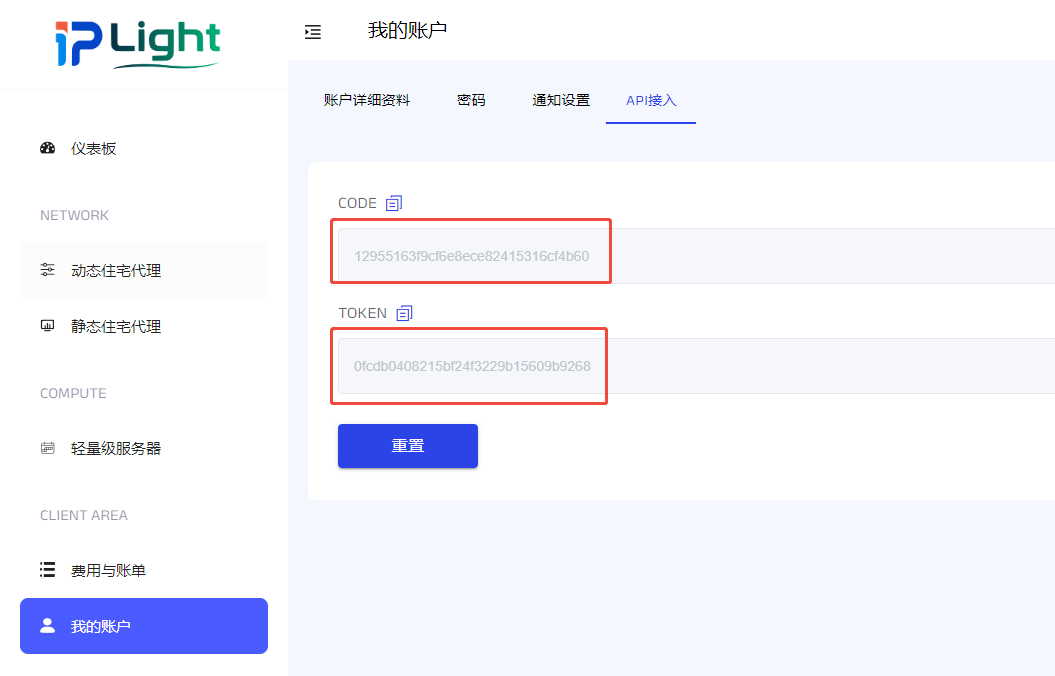
安全建议
- 请妥善保管您的 API Key,不要泄露给他人
- 定期更换 API Key 以提高安全性
- 不要在客户端代码中硬编码 API Key
- 如果怀疑 API Key 泄露,请立即重新生成
住宅代理
住宅代理服务提供来自真实住宅 IP 的代理,具有以下功能:
账号管理
- 账号列表 - 查看和管理所有用户
账号使用
- 查询流量余额 - 查看账号的流量使用情况和剩余流量
- 查询流量统计 - 查看账号的流量使用统计列表
- 查询接入点 - 查看可用的代理服务器接入点
- 查询可用国家地区 - 查看可用的国家地区列表
- 接口提取 - 提取动态住宅代理使用
主要特点
- 全球覆盖:支持全球多个国家和地区的 IP
- 动态切换:支持自动切换 IP,避免被封禁
- 高度定制:可根据国家、州/省、城市进行精确定位
- 通道管理:支持创建多个独立通道,便于业务隔离
- 实时监控:提供详细的流量统计和使用报告
账号列表
获取账号列表信息详情。
接口信息
GET /client/dynamics/account/accountList?pageSize=10&pageNum=1
请求头
| 参数名 | 类型 | 描述 |
|---|---|---|
| x-merchant-token | String | 商户令牌 |
| x-merchant-code | String | 商户代码 |
| Content-Type | String | application/json |
请求参数
| 参数名 | 必选 | 类型 | 描述 |
|---|---|---|---|
| pageSize | 否 | Integer | 每页显示记录数 |
| pageNum | 否 | Integer | 当前页码 |
响应示例
{
    "total": 1,
    "rows": [
        {
          "accountId": "384940",
          "status": "active",
          "poolType": "residential",
          "account": "account1234",
          "trafficLimit": 1000.000000,
          "remarks": "",
          "createTime": "2025-07-22 11:19:40"
        }
    ],
    "code": 200,
    "msg": "查询成功"
}
响应参数说明
| 参数名 | 类型 | 描述 |
|---|---|---|
| accountId | String | 账户ID |
| status | String | 状态 (active/pending) |
| poolType | String | 代理类型 (residential/datacenter/mobile) |
| account | String | 账号 |
| trafficLimit | Double | 流量限制(MB) |
| remarks | String | 备注 |
| createTime | Date | 创建时间 |
账号详情
账号详情提供了用户账号的各项配置和管理功能:
流量管理
接入点
查询流量余额
查询指定用户的流量余额信息。
接口信息
GET /client/dynamics/account/balance/info
请求头
| 参数名 | 类型 | 描述 |
|---|---|---|
| x-merchant-token | String | 商户令牌 |
| x-merchant-code | String | 商户代码 |
| Content-Type | String | application/json |
请求参数
| 参数名 | 必选 | 类型 | 描述 |
|---|---|---|---|
| accountId | 是 | Long | 账号ID |
| pageSize | 否 | Integer | 每页显示记录数 |
| pageNum | 否 | Integer | 当前页码 |
响应示例
{
    "total": 1,
    "rows": [
        {
          "accountId": "816219",
          "balance": 326999.978943,
          "balanceFormat": "326999.98 MB",
          "balanceTotal": 327000.000000,
          "balanceTotalFormat": "327000.00 MB",
          "balanceUsed": 0.021057,
          "balanceUsedFormat": "0.02 MB"
        }
    ],
    "code": 200,
    "msg": "查询成功"
}
代码示例
// 使用 fetch 查询余额
fetch('/client/dynamics/account/balance/info?accountId=123&pageSize=10&pageNum=1', {
    method: 'GET',
    headers: {
        'x-merchant-token': 'your_token',
        'x-merchant-code': 'your_code',
        'Content-Type': 'application/json'
    }
})
.then(response => response.json())
.then(data => console.log(data));
响应参数说明
| 参数名 | 类型 | 描述 |
|---|---|---|
| accountId | Long | 用户账号ID |
| balance | BigDecimal | 剩余流量(MB) |
| balanceFormat | String | 剩余流量(格式化) |
| balanceTotal | BigDecimal | 总流量(MB) |
| balanceTotalFormat | String | 总流量(格式化) |
| balanceUsed | BigDecimal | 已使用流量(MB) |
| balanceUsedFormat | String | 已使用流量(格式化) |
查询流量余额
查询指定用户的流量统计信息。
接口信息
GET /client/dynamics/account/stat/list
请求头
| 参数名 | 类型 | 描述 |
|---|---|---|
| x-merchant-token | String | 商户令牌 |
| x-merchant-code | String | 商户代码 |
| Content-Type | String | application/json |
请求参数
| 参数名 | 必选 | 类型 | 描述 |
|---|---|---|---|
| accountId | 是 | Long | 用户账号ID |
| startTime | 是 | String | 开始时间(yyyy-MM-dd) |
| endTime | 是 | String | 结束时间(yyyy-MM-dd) |
响应示例
{
  "msg": "操作成功",
  "code": 200,
  "data": [
    {
      "requestsTotal": 0,
      "trafficTotal": 0.02,
      "dusage": "2025-07-22"
    },
    {
      "requestsTotal": 0,
      "trafficTotal": 0.01,
      "dusage": "2025-07-23"
    },
    {
      "requestsTotal": 0,
      "trafficTotal": 2670.54,
      "dusage": "2025-07-26"
    },
    {
      "requestsTotal": 0,
      "trafficTotal": 354.39,
      "dusage": "2025-07-28"
    }
  ]
}
代码示例
// 使用 fetch 查询流量统计
fetch(' /client/dynamics/account/stat/list?accountId=123&startTime=2025-07-22&endTime=2025-07-28', {
    method: 'GET',
    headers: {
        'x-merchant-token': 'your_token',
        'x-merchant-code': 'your_code',
        'Content-Type': 'application/json'
    }
})
.then(response => response.json())
.then(data => console.log(data));
响应参数说明
| 参数名 | 类型 | 描述 |
|---|---|---|
| trafficTotal | BigDecimal | 流量总数(MB) |
| dUsage | String | 日期 |
注意事项
- 部分动态账号支持查询当天的流量统计(startTime和endTime都设置为当天日期,分时返回yyyy-MM-dd hh:mm:ss格式的流量统计)
查询接入点
查询账号可用的接入点列表。
接口信息
GET /client/dynamics/account/endpoint/info
请求头
| 参数名 | 类型 | 描述 |
|---|---|---|
| x-merchant-token | String | 商户令牌 |
| x-merchant-code | String | 商户代码 |
请求参数
| 参数名 | 必选 | 类型 | 描述 |
|---|---|---|---|
| accountId | 是 | Long | 用户账号ID |
代码示例
fetch('/client/dynamics/account/endpoint/info?accountId=1', {
    method: 'GET',
    headers: {
        'x-merchant-token': 'your_token',
        'x-merchant-code': 'your_code'
    }
})
.then(response => response.json())
.then(data => console.log(data));
响应示例
{
    "total": 1,
    "rows": [
        {
          "accountId": "384933",
          "endpointHost": "gate-us.host.io",
          "endpointPort": 13233,
          "supportedProtocol": "http"
        }
    ],
    "code": 200,
    "msg": "查询成功"
}
响应参数说明
| 参数名 | 类型 | 描述 |
|---|---|---|
| accountId | String | 账户ID |
| endpointHost | String | 接入点主机地址 |
| endpointPort | Integer | 接入点端口号 |
| supportedProtocol | String | 支持的协议 (如 http, socks5 等) |
查询可用国家地区
查询可用国家地区信息。
接口信息
GET /client/ip/dynamics/getLocationList
请求头
| 参数名 | 类型 | 描述 |
|---|---|---|
| x-merchant-token | String | 商户令牌 |
| x-merchant-code | String | 商户代码 |
| Content-Type | String | application/json |
请求参数
| 参数名 | 必选 | 类型 | 描述 |
|---|---|---|---|
| accountId | 是 | Long | 用户账号ID |
响应示例
{
    "total": 15420,
    "rows": [
      {
        "countryCode": "AD",
        "countryName": "安道尔公国",
        "stateCode": "encamp",
        "cityCode": "encamp"
      },
      {
        "countryCode": "AE",
        "countryName": "阿联酋",
        "stateCode": "abudhabi",
        "cityCode": "abudhabi"
      }
    ],
    "code": 200,
    "msg": "查询成功"
}
代码示例
// 使用 fetch 查询地区
fetch('/client/ip/dynamics/getLocationList?accountId=123', {
    method: 'GET',
    headers: {
        'x-merchant-token': 'your_token',
        'x-merchant-code': 'your_code',
        'Content-Type': 'application/json'
    }
})
.then(response => response.json())
.then(data => console.log(data));
响应参数说明
| 参数名 | 类型 | 描述 |
|---|---|---|
| countryCode | String | 国家代码 |
| countryName | String | 国家名称 |
| stateCode | String | 州/省代码 |
| cityCode | String | 城市代码 |
接口提取
提取指定动态账户的使用接口。
接口信息
POST /client/ip/dynamics/exportIp
请求头
| 参数名 | 类型 | 描述 |
|---|---|---|
| x-merchant-token | String | 商户令牌 |
| x-merchant-code | String | 商户代码 |
| Content-Type | String | application/json |
请求参数
| 参数名 | 必选 | 类型 | 描述 |
|---|---|---|---|
| accountId | 是 | String | 用户账号ID |
| endpointHost | 是 | String | 接入点Host地址 |
| endpointPort | 是 | String | 接入点端口号 |
| count | 是 | Integer | 导出数量,范围1-1000 |
| formatType | 是 | Integer | 导出格式类型,值0、1、2或3 |
| poolCode | 否 | String | 代理池代码 |
| countryCode | 否 | String | 国家代码 |
| stateCode | 否 | String | 州/省代码 |
| cityCode | 否 | String | 城市代码 |
| sessionCode | 否 | String | 会话代码 |
| sessionTime | 否 | String | 会话时间 |
导出格式
| formatType | 格式 |
|---|---|
| 0 | account:password@endpointHost:endpointPort |
| 1 | endpointHost:endpointPort@account:password |
| 2 | account:password:endpointHost:endpointPort |
| 3 | endpointHost:endpointPort:account:password |
响应示例
{
  "msg": "操作成功",
  "code": 200,
  "data": [
    "as.d.iplight.net:2333@iplt840336-zone-custom-region-us-session-abcd:qwer1234",
    "as.d.iplight.net:2333@iplt840336-zone-custom-region-us-session-BMWGJ:qwer1234",
    "as.d.iplight.net:2333@iplt840336-zone-custom-region-us-session-EbInJ:qwer1234",
    "as.d.iplight.net:2333@iplt840336-zone-custom-region-us-session-Pfz2J:qwer1234"
  ]
}
代码示例
const response = await fetch('/client/ip/dynamics/exportIp', {
    method: 'POST',
    headers: {
        'Content-Type': 'application/json',
        'x-merchant-token': 'your-token-here',
        'x-merchant-code': 'your-merchant-code'
    },
    body: JSON.stringify({
        "accountId": "816222",
        "count": "4",
        "formatType": "1",
        "endpointHost": "as.d.iplight.net",
        "endpointPort": "2333",
        "countryCode": "us",
        "sessionCode": "abcd"
    })
});
注意事项
- 国家-州/省-城市参数需要逐级填写(即不能仅填写城市而没有填写国家或州/省)
刷新会话IP
刷新会话IP。
接口信息
POST /client/ip/dynamics/refreshSession
请求头
| 参数名 | 类型 | 描述 |
|---|---|---|
| x-merchant-token | String | 商户令牌 |
| x-merchant-code | String | 商户代码 |
| Content-Type | String | application/json |
请求参数
| 参数名 | 必选 | 类型 | 描述 |
|---|---|---|---|
| accountCode | 是 | String | 动态账号 |
| sessionCode | 是 | String | 会话代码 |
代码示例
const response = await fetch('/client/ip/dynamics/refreshSession', {
    method: 'POST',
    headers: {
        'Content-Type': 'application/json',
        'x-merchant-token': 'your-token-here',
        'x-merchant-code': 'your-merchant-code'
    },
    body: JSON.stringify({
        "accountCode": "iplt1000",
        "sessionCode": "YNW68s"
    })
});
响应示例
{
  "msg": "刷新成功",
  "code": 200
}
数据中心代理
数据中心代理服务提供的代理,具有以下功能:
账号管理
- 账号列表 - 查看和管理所有用户
账号使用
- 查询流量余额 - 查看账号的流量使用情况和剩余流量
- 查询流量统计 - 查看账号的流量使用统计列表
- 查询接入点 - 查看可用的代理服务器接入点
- 查询可用国家地区 - 查看可用的国家地区列表
- 接口提取 - 提取数据中心代理使用
主要特点
- 全球覆盖:支持全球多个国家和地区的 IP
- 动态切换:支持自动切换 IP,避免被封禁
- 高度定制:可根据国家、州/省、城市进行精确定位
- 通道管理:支持创建多个独立通道,便于业务隔离
- 实时监控:提供详细的流量统计和使用报告
账号列表
获取账号列表信息详情。
接口信息
GET /client/dynamics/account/accountList?pageSize=10&pageNum=1
请求头
| 参数名 | 类型 | 描述 |
|---|---|---|
| x-merchant-token | String | 商户令牌 |
| x-merchant-code | String | 商户代码 |
| Content-Type | String | application/json |
请求参数
| 参数名 | 必选 | 类型 | 描述 |
|---|---|---|---|
| poolType | 是 | String | 必填,固定为'datacenter' |
| pageSize | 否 | Integer | 每页显示记录数 |
| pageNum | 否 | Integer | 当前页码 |
响应示例
{
    "total": 1,
    "rows": [
        {
          "accountId": "384940",
          "status": "active",
          "poolType": "residential",
          "account": "account1234",
          "trafficLimit": 1000.000000,
          "remarks": "",
          "createTime": "2025-07-22 11:19:40"
        }
    ],
    "code": 200,
    "msg": "查询成功"
}
响应参数说明
| 参数名 | 类型 | 描述 |
|---|---|---|
| accountId | String | 账户ID |
| status | String | 状态 (active/pending) |
| poolType | String | 代理类型 (residential/datacenter/mobile) |
| account | String | 账号 |
| trafficLimit | Double | 流量限制(MB) |
| remarks | String | 备注 |
| createTime | Date | 创建时间 |
账号详情
账号详情提供了用户账号的各项配置和管理功能:
流量管理
接入点
查询流量余额
查询指定用户的流量余额信息。
接口信息
GET /client/dynamics/account/balance/info
请求头
| 参数名 | 类型 | 描述 |
|---|---|---|
| x-merchant-token | String | 商户令牌 |
| x-merchant-code | String | 商户代码 |
| Content-Type | String | application/json |
请求参数
| 参数名 | 必选 | 类型 | 描述 |
|---|---|---|---|
| accountId | 是 | Long | 账号ID |
| pageSize | 否 | Integer | 每页显示记录数 |
| pageNum | 否 | Integer | 当前页码 |
响应示例
{
    "total": 1,
    "rows": [
        {
          "accountId": "816219",
          "balance": 326999.978943,
          "balanceFormat": "326999.98 MB",
          "balanceTotal": 327000.000000,
          "balanceTotalFormat": "327000.00 MB",
          "balanceUsed": 0.021057,
          "balanceUsedFormat": "0.02 MB"
        }
    ],
    "code": 200,
    "msg": "查询成功"
}
代码示例
// 使用 fetch 查询余额
fetch('/client/dynamics/account/balance/info?accountId=123&pageSize=10&pageNum=1', {
    method: 'GET',
    headers: {
        'x-merchant-token': 'your_token',
        'x-merchant-code': 'your_code',
        'Content-Type': 'application/json'
    }
})
.then(response => response.json())
.then(data => console.log(data));
响应参数说明
| 参数名 | 类型 | 描述 |
|---|---|---|
| accountId | Long | 用户账号ID |
| balance | BigDecimal | 剩余流量(MB) |
| balanceFormat | String | 剩余流量(格式化) |
| balanceTotal | BigDecimal | 总流量(MB) |
| balanceTotalFormat | String | 总流量(格式化) |
| balanceUsed | BigDecimal | 已使用流量(MB) |
| balanceUsedFormat | String | 已使用流量(格式化) |
查询流量余额
查询指定用户的流量统计信息。
接口信息
GET /client/dynamics/account/stat/list
请求头
| 参数名 | 类型 | 描述 |
|---|---|---|
| x-merchant-token | String | 商户令牌 |
| x-merchant-code | String | 商户代码 |
| Content-Type | String | application/json |
请求参数
| 参数名 | 必选 | 类型 | 描述 |
|---|---|---|---|
| accountId | 是 | Long | 用户账号ID |
| startTime | 是 | String | 开始时间(yyyy-MM-dd) |
| endTime | 是 | String | 结束时间(yyyy-MM-dd) |
响应示例
{
  "msg": "操作成功",
  "code": 200,
  "data": [
    {
      "requestsTotal": 0,
      "trafficTotal": 0.02,
      "dusage": "2025-07-22"
    },
    {
      "requestsTotal": 0,
      "trafficTotal": 0.01,
      "dusage": "2025-07-23"
    },
    {
      "requestsTotal": 0,
      "trafficTotal": 2670.54,
      "dusage": "2025-07-26"
    },
    {
      "requestsTotal": 0,
      "trafficTotal": 354.39,
      "dusage": "2025-07-28"
    }
  ]
}
代码示例
// 使用 fetch 查询流量统计
fetch(' /client/dynamics/account/stat/list?accountId=123&startTime=2025-07-22&endTime=2025-07-28', {
    method: 'GET',
    headers: {
        'x-merchant-token': 'your_token',
        'x-merchant-code': 'your_code',
        'Content-Type': 'application/json'
    }
})
.then(response => response.json())
.then(data => console.log(data));
响应参数说明
| 参数名 | 类型 | 描述 |
|---|---|---|
| trafficTotal | BigDecimal | 流量总数(MB) |
| dUsage | String | 日期 |
注意事项
- 部分账号支持查询当天的流量统计(startTime和endTime都设置为当天日期,分时返回yyyy-MM-dd hh:mm:ss格式的流量统计)
查询接入点
查询账号可用的接入点列表。
接口信息
GET /client/dynamics/account/endpoint/info
请求头
| 参数名 | 类型 | 描述 |
|---|---|---|
| x-merchant-token | String | 商户令牌 |
| x-merchant-code | String | 商户代码 |
请求参数
| 参数名 | 必选 | 类型 | 描述 |
|---|---|---|---|
| accountId | 是 | Long | 用户账号ID |
代码示例
fetch('/client/dynamics/account/endpoint/info?accountId=1', {
    method: 'GET',
    headers: {
        'x-merchant-token': 'your_token',
        'x-merchant-code': 'your_code'
    }
})
.then(response => response.json())
.then(data => console.log(data));
响应示例
{
    "total": 1,
    "rows": [
        {
          "accountId": "384933",
          "endpointHost": "gate-us.host.io",
          "endpointPort": 13233,
          "supportedProtocol": "http"
        }
    ],
    "code": 200,
    "msg": "查询成功"
}
响应参数说明
| 参数名 | 类型 | 描述 |
|---|---|---|
| accountId | String | 账户ID |
| endpointHost | String | 接入点主机地址 |
| endpointPort | Integer | 接入点端口号 |
| supportedProtocol | String | 支持的协议 (如 http, socks5 等) |
查询可用国家地区
查询可用国家地区信息。
接口信息
GET /client/ip/dynamics/getLocationList
请求头
| 参数名 | 类型 | 描述 |
|---|---|---|
| x-merchant-token | String | 商户令牌 |
| x-merchant-code | String | 商户代码 |
| Content-Type | String | application/json |
请求参数
| 参数名 | 必选 | 类型 | 描述 |
|---|---|---|---|
| accountId | 是 | Long | 用户账号ID |
响应示例
{
    "total": 15420,
    "rows": [
      {
        "countryCode": "AD",
        "countryName": "安道尔公国",
        "stateCode": "encamp",
        "cityCode": "encamp"
      },
      {
        "countryCode": "AE",
        "countryName": "阿联酋",
        "stateCode": "abudhabi",
        "cityCode": "abudhabi"
      }
    ],
    "code": 200,
    "msg": "查询成功"
}
代码示例
// 使用 fetch 查询地区
fetch('/client/ip/dynamics/getLocationList?accountId=123', {
    method: 'GET',
    headers: {
        'x-merchant-token': 'your_token',
        'x-merchant-code': 'your_code',
        'Content-Type': 'application/json'
    }
})
.then(response => response.json())
.then(data => console.log(data));
响应参数说明
| 参数名 | 类型 | 描述 |
|---|---|---|
| countryCode | String | 国家代码 |
| countryName | String | 国家名称 |
| stateCode | String | 州/省代码 |
| cityCode | String | 城市代码 |
接口提取
提取指定数据中心代理账号的使用接口。
接口信息
POST /client/ip/dynamics/exportIp
请求头
| 参数名 | 类型 | 描述 |
|---|---|---|
| x-merchant-token | String | 商户令牌 |
| x-merchant-code | String | 商户代码 |
| Content-Type | String | application/json |
请求参数
| 参数名 | 必选 | 类型 | 描述 |
|---|---|---|---|
| accountId | 是 | String | 用户账号ID |
| endpointHost | 是 | String | 接入点Host地址 |
| endpointPort | 是 | String | 接入点端口号 |
| count | 是 | Integer | 导出数量,范围1-1000 |
| formatType | 是 | Integer | 导出格式类型,值0、1、2或3 |
| countryCode | 否 | String | 国家代码 |
| sessionCode | 否 | String | 会话代码 |
导出格式
| formatType | 格式 |
|---|---|
| 0 | account:password@endpointHost:endpointPort |
| 1 | endpointHost:endpointPort@account:password |
| 2 | account:password:endpointHost:endpointPort |
| 3 | endpointHost:endpointPort:account:password |
响应示例
{
  "msg": "操作成功",
  "code": 200,
  "data": [
    "as.d.iplight.net:2333@iplt840336-zone-custom-region-us-session-abcd:qwer1234",
    "as.d.iplight.net:2333@iplt840336-zone-custom-region-us-session-BMWGJ:qwer1234",
    "as.d.iplight.net:2333@iplt840336-zone-custom-region-us-session-EbInJ:qwer1234",
    "as.d.iplight.net:2333@iplt840336-zone-custom-region-us-session-Pfz2J:qwer1234"
  ]
}
代码示例
const response = await fetch('/client/ip/dynamics/exportIp', {
    method: 'POST',
    headers: {
        'Content-Type': 'application/json',
        'x-merchant-token': 'your-token-here',
        'x-merchant-code': 'your-merchant-code'
    },
    body: JSON.stringify({
        "accountId": "816222",
        "count": "4",
        "formatType": "1",
        "endpointHost": "as.d.iplight.net",
        "endpointPort": "2333",
        "countryCode": "us",
        "sessionCode": "abcd"
    })
});
静态代理
静态代理服务提供固定IP地址的代理解决方案,支持多国家地区的IP资源,具有高稳定性和独享性特点。
服务目录
IP管理
订单管理
主要特点
- 固定的IP地址资源
- 稳定可靠的网络质量
- 多区域IP资源支持
- 完善的订单管理系统
- 便捷的支付流程
- 详细的使用文档
快速开始
-
查看IP资源
- 使用IP位置查询功能浏览可用资源
- 选择合适的IP地址
-
购买服务
- 通过下单功能选择所需IP
- 确认订单信息
- 完成支付流程
-
管理IP
- 使用IP列表查询功能管理已购IP
- 监控IP使用状态
- 及时续费或升级服务
ip列表查询
查询已购买的静态IP列表。
接口信息
GET /client/ip/pool/item/merchantIpList
请求头
| 参数名 | 类型 | 描述 |
|---|---|---|
| x-merchant-token | String | 商户令牌 |
| x-merchant-code | String | 商户代码 |
请求参数
| 参数名 | 必选 | 类型 | 描述 |
|---|---|---|---|
| ip | 否 | String | IP |
| status | 否 | Integer | IP状态:1-已生效, 2-已过期 3-已退订 |
| type | 否 | Integer | IP类别:0广播 1原生 |
| ipCategory | 否 | String | IP属性:HOST-住宅, IDC-机房 |
| orderNo | 否 | String | 订单号 |
| pageSize | 否 | Integer | 每页显示记录数 |
| pageNum | 否 | Integer | 当前页码 |
代码示例
/client/ip/pool/item/merchantIpList?ip=156.252&status=1&type=1&pageSize=1
响应示例
{
  "total": 58,
  "rows": [
    {
      "createBy": null,
      "createTime": "2025-03-24 20:22:31",
      "updateBy": null,
      "updateTime": "2025-03-24 23:26:14",
      "remark": null,
      "id": 147,
      "poolId": 1,
      "merchantId": 1,
      "lastOrderId": 176,
      "sourceCode": null,
      "sourceName": null,
      "account": "justinka",
      "password": "34372766",
      "port": "2340",
      "ip": "156.252.8.76",
      "protocolse": null,
      "effectiveDatetime": "2025-03-24",
      "expireDatetime": "2025-05-23",
      "status": 1,
      "type": 1,
      "ipCategory": "HOST",
      "continent": "Asia",
      "countryCode": "VN",
      "location": "",
      "hot": "N"
    }
  ],
  "code": 200,
  "msg": "查询成功"
}
响应参数说明
| 参数名 | 类型 | 描述 |
|---|---|---|
| id | Long | 记录ID |
| account | String | 账号 |
| password | String | 密码 |
| port | String | 端口 |
| ip | String | IP地址 |
| effectiveDatetime | String | 生效时间 |
| expireDatetime | String | 到期时间 |
| status | Integer | 状态:1-已生效, 2-已过期 3-已退订 |
| type | Integer | IP类别 0广播 1原生 |
| ipCategory | String | IP属性 HOST住宅 IDC机房 |
| continent | String | 大洲 |
| countryCode | String | 国家代码 |
| location | String | 位置 |
可购地区列表查询
查询可购买地区IP数量
接口信息
GET /client/ip/pool/regionalAvailableIps
请求头
| 参数名 | 类型 | 描述 |
|---|---|---|
| x-merchant-token | String | 商户令牌 |
| x-merchant-code | String | 商户代码 |
请求参数
| 参数名 | 必选 | 类型 | 描述 |
|---|---|---|---|
| type | 否 | Integer | IP类别 0广播 1原生 |
| ipCategory | 否 | String | IP属性 IDC机房 HOST住宅 |
| continents | 否 | Array[String] | 州列表 |
| countryCodes | 否 | Array[String] | 国家代码列表 |
| locations | 否 | Array[String] | 省/区列表 |
代码示例
/client/ip/pool/regionalAvailableIps
响应示例
{
  "total": 2,
  "rows": [
    {
      "id": 4,
      "type": 1,
      "ipCategory": "HOST",
      "continent": "Eastern Asia",
      "countryCode": "HK",
      "location": "Hongkong",
      "price": 5.000,
      "ipTotals": 46
    },
    {
      "id": 3,
      "type": 0,
      "ipCategory": "HOST",
      "continent": "Eastern Asia",
      "countryCode": "HK",
      "location": "Hongkong",
      "price": 2.200,
      "ipTotals": 111
    }
  ],
  "code": 200,
  "msg": "查询成功"
}
响应参数说明
| 参数名 | 类型 | 描述 |
|---|---|---|
| type | Integer | 状态:0-广播, 1-原生 |
| ipCategory | String | IP属性:HOST-住宅, IDC-机房 |
| continent | String | 大洲 |
| countryCode | String | 国家代码 |
| location | String | 省/区位置 |
| price | double | 月单价 |
| ipTotals | Integer | 可购数量 |
钱包余额查询
钱包余额查询
接口信息
GET /client/merchant/walletInfo
请求头
| 参数名 | 类型 | 描述 |
|---|---|---|
| x-merchant-token | String | 商户令牌 |
| x-merchant-code | String | 商户代码 |
响应示例
{
  "msg": "操作成功",
  "code": 200,
  "data": {
    "balance": 20.000,
    "totalAmount": 100.500
  }
}
响应参数说明
| 参数名 | 类型 | 描述 |
|---|---|---|
| balance | double | 余额 |
| totalAmount | double | 总花费金额 |
静态代理订单
静态代理订单模块提供了静态IP代理服务的订购和管理功能。通过这些接口,您可以购买静态IP代理、管理订单并完成支付。
功能特点
订单管理
- 下单
- 支持批量购买静态IP
- 自动计算订单金额
- 支持多种支付方式
- 提供详细的订单信息
支付处理
- 订单支付
- 支持多种支付方式
- 实时支付状态更新
- 自动余额校验
- 支付结果通知
使用流程
-
创建订单
- 选择购买数量和周期
- 确认订单金额
- 联系我们确保IP库存充足(临时方案,后续会开发接口自主查询库存)
- 提交订单请求 调用/client/order/addStatic接口
- 获取订单ID 获取resp.data作为订单ID
-
完成支付
- 使用订单ID发起支付 调用/client/payment/order/pay/{orderId}接口
- 选择支付方式 当前仅支持BALANCE
- 确认支付结果
- 查看订单状态
使用建议
- 下单前确认所需的静态IP数量
- 注意检查账户余额是否充足
- 保存订单ID以便后续查询
- 及时确认支付结果状态
- 如遇支付失败,查看具体错误信息
新购下单
本接口用于新购下单
接口信息
POST /client/order/addStatic
请求头
| 参数名 | 必选 | 类型 | 说明 |
|---|---|---|---|
| x-merchant-token | 是 | string | 商户访问令牌 |
| x-merchant-code | 是 | string | 商户编码 |
请求参数
| 参数名 | 必选 | 类型 | 说明 |
|---|---|---|---|
| countryNums | 是 | Array of CountryNumsItemVO | 国家IP数量分配列表 |
| monthCount | 是 | Long | 购买几个月 |
| currency | 是 | String | 货币类型USD |
CountryNumsItemVO结构
| 参数名 | 必选 | 类型 | 说明 |
|---|---|---|---|
| countryCode | 是 | String | 国家代码 |
| location | 是 | String | 省/州/区 |
| num | 是 | Long | 该国家需要的IP数量 |
| ipType | 是 | Long | 0:广播 1:原生 |
| ipCategory | 是 | String | HOST-住宅 IDC-机房 |
请求示例
const response = await fetch('/client/order/addStatic', {
  method: 'POST',
  headers: {
    'Content-Type': 'application/json',
    'x-merchant-token': 'your-token-here',
    'x-merchant-code': 'your-merchant-code'
  },
  body: JSON.stringify({
      "countryNums": [
          {
              "countryCode": "US",
              "num": "2",
              "location" : "New York",
              "ipType":1,
              "ipCategory":"HOST"
          }
      ],
      "monthCount":1,
      "currency":"USD"
  })
});

const result = await response.json();
响应结果
{
    "msg": "操作成功",
    "code": 200,
    "data": "N2025032701271232584"
}
续费下单
本接口用于续费下单,支持批量IP续费。
接口信息
POST /client/order/renewIpList
请求头
| 参数名 | 必选 | 类型 | 说明 |
|---|---|---|---|
| x-merchant-token | 是 | string | 商户访问令牌 |
| x-merchant-code | 是 | string | 商户编码 |
请求参数
| 参数名 | 必选 | 类型 | 说明 |
|---|---|---|---|
| ipList | 是 | Array[String] | IP列表 |
| monthCount | 是 | Long | 续费几个月 |
请求示例
const response = await fetch('/client/order/renewIpList', {
  method: 'POST',
  headers: {
    'Content-Type': 'application/json',
    'x-merchant-token': 'your-token-here',
    'x-merchant-code': 'your-merchant-code'
  },
  body: JSON.stringify({
      "ipList": [
          "43.255.80.100"
      ],
      "monthCount": 1
  })
});

const result = await response.json();
响应结果
{
    "msg": "下单成功",
    "code": 200,
    "data": "N2025032701271232584"
}
退订下单
本接口用于退订下单,支持批量IP退订。
接口信息
POST /client/order/unsubscribeStaticIps
请求头
| 参数名 | 必选 | 类型 | 说明 |
|---|---|---|---|
| x-merchant-token | 是 | string | 商户访问令牌 |
| x-merchant-code | 是 | string | 商户编码 |
请求参数
| 参数名 | 必选 | 类型 | 说明 |
|---|---|---|---|
| ipList | 是 | Array[String] | IP列表 |
请求示例
const response = await fetch('/client/order/unsubscribeStaticIps', {
  method: 'POST',
  headers: {
    'Content-Type': 'application/json',
    'x-merchant-token': 'your-token-here',
    'x-merchant-code': 'your-merchant-code'
  },
  body: JSON.stringify({
      "ipList": [
          "43.255.80.100"
      ]
  })
});

const result = await response.json();
响应结果
{
    "msg": "操作成功",
    "code": 200,
    "data": "true"
}
订单支付
支付订单。
接口信息
POST /client/payment/order/pay/{orderId}
请求头
| 参数名 | 类型 | 描述 |
|---|---|---|
| x-merchant-token | String | 商户令牌 |
| x-merchant-code | String | 商户代码 |
| Content-Type | String | application/json |
路径参数
| 参数名 | 类型 | 描述 |
|---|---|---|
| orderId | String | 订单ID,从下单返回值中获取 |
请求参数
| 参数名 | 类型 | 描述 |
|---|---|---|
| payment | String | 支付方式,目前仅支持"BALANCE" |
请求示例
{
    "payment": "BALANCE"
}
代码示例
fetch('/client/payment/order/pay/N2025032701271232584', {
    method: 'POST',
    headers: {
        'x-merchant-token': 'your_token',
        'x-merchant-code': 'your_code',
        'Content-Type': 'application/json'
    },
    body: JSON.stringify({
        payment: "BALANCE"
    })
})
.then(response => response.json())
.then(data => console.log(data));
响应示例
{
      "msg": "操作成功",
      "code": 200,
      "data": {
        "paymentType": "BALANCE",
        "paymentName": "余额支付",
        "orderId": 207,
        "status": 1,
        "payMessage": "success"
      }
}

//错误返回
{"msg":"余额不足","code":500}
响应参数说明
| 参数名 | 类型 | 描述 |
|---|---|---|
| paymentType | String | 支付方式 |
| paymentName | String | 支付方式名称 |
| status | Integer | 支付状态(1=支付成功,0=支付失败) |
| orderId | String | 订单ID |
| payMessage | String | 支付信息 |
错误码说明
| 错误码 | 描述 |
|---|---|
| 500 | 订单已失效 |
| 500 | 商户钱包账户不存在 |
| 500 | 余额不足 |
轻量级服务器
轻量级服务器是一种资源占用少、启动迅速、部署简单的服务器解决方案,专为中小型应用、开发测试环境或边缘计算场景设计。
服务目录
IP管理
- 退订IP
- 退订已分配的服务器IP
退订服务器IP
本接口用于退订服务器IP,支持批量IP退订。
接口信息
POST /client/ip/server/unsubscribeIp
请求头
| 参数名 | 必选 | 类型 | 说明 |
|---|---|---|---|
| x-merchant-token | 是 | string | 商户访问令牌 |
| x-merchant-code | 是 | string | 商户编码 |
请求参数
| 参数名 | 必选 | 类型 | 说明 |
|---|---|---|---|
| unsubscribeData | 是 | Array[UnsubscribeData] | 退订IP详情列表 |
| unsubscribeDate | 否 | String | 退订日期,格式YYYY-MM-DD 默认当日 |
unsubscribeData结构
| 参数名 | 必选 | 类型 | 说明 |
|---|---|---|---|
| countryCode | 是 | String | 国家代码 |
| ip | 是 | String | IP |
请求示例
const response = await fetch('/client/ip/server/unsubscribeIp', {
  method: 'POST',
  headers: {
    'Content-Type': 'application/json',
    'x-merchant-token': 'your-token-here',
    'x-merchant-code': 'your-merchant-code'
  },
  body: JSON.stringify({
      "unsubscribeData": [
          {
              "ip": "38.213.215.254",
              "countryCode": "US"
          },
          {
              "ip": "163.171.216.31",
              "countryCode": "RU"
          }
      ],
      "unsubscribeDate": "2025-11-18"
  })
});

const result = await response.json();
响应结果
{
    "msg": "操作成功",
    "code": 200,
    "data": "true"
}
{
    "msg": "退订失败:退订IP中包含主机IP(103.102.126.10),主机IP不允许退订",
    "code": 3000
}